#Bluetooth Service
The Bluetooth Service is responsible for communicating the Bluetooth subsystem with rest of the operating system.
#Connecting to the Bluetooth device
To be able to connect to the device with more than one audio profile, the Profile Manager has been developed. It allows connecting to the A2DP and HSP profiles at once while maintaining the flexibility of switching between them without any additional lag, which could happen during reconnecting to the device. It provides the following functionalities:
- connecting/disconnecting to the device
- switching between A2DP (high-quality audio) and HSP (headset profile) back and forth
- stream control: pause, resume, start, stop
A temporary user interface is located in place of the old Bluetooth settings.
The Bluetooth message API will be unified shortly to allow integrating it with the audio service.
#Scanning - general view
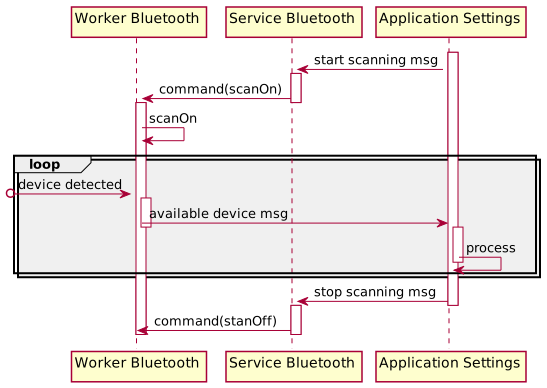
The Bluetooth scanning procedure is triggered by and terminated with specific, asynchronous messages. Upon receiving
a StartScan message the ServiceBluetooth shall send ScanOn command to the WorkerBluetooth, responsible for the Pure-BT-device
management. Until the ScanOff command is not received, the worker will continue to notify ApplicationSettings with detected devices.
The above is summarized on the following sequence diagram:
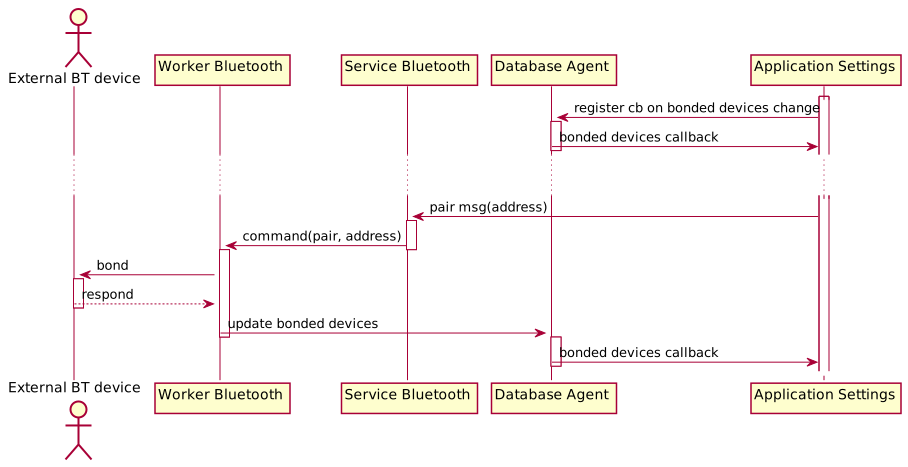
#Pairing - general view
The Bluetooth pairing procedure starts with the following preconditions
- the scanning has been performed and the
ApplicationSettingshas received a list of available devices successfully, ApplicationSettingshas registered its on-bonded-devices-changed-callback inDatabaseAgent.
On that premise, ServiceBlueooth will receive a Pairing message with an address (of a device the initiator requests pairing with)
and forward it in the form of the Pair command to WorkerBluetooth. After successful pairing, the worker will serialize
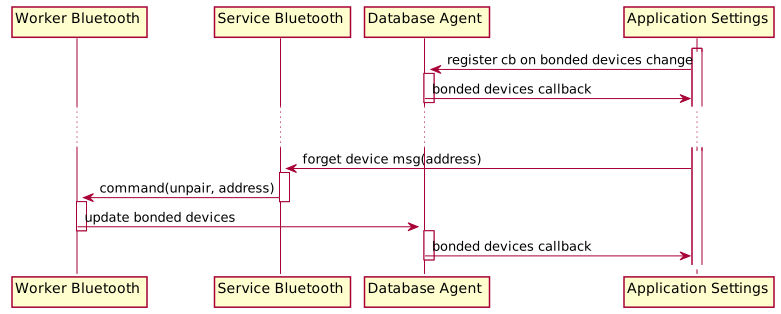
and send the device data to DatabaseAgent so the event result could be saved and its recipient notified. Unpairing flow is
analogous to the pairing procedure with no requirement of an external Bluetooth device involvement.